
Run your maintenance from one Excel file.
Mini-GMAO puts your machines, preventive plan, work orders, spare parts and KPIs in one workbook. Set it up in 15 minutes. No subscription, no install, no macros.
- Excel 2010+ · Google Sheets
- English + Français
- No macros
Maintenance that lives on paper and in people's heads
Breakdowns repeat
Repairs are noted on paper or not at all, so nobody sees that the same press failed three times this year.
Preventive tasks slip
Filter changes and lubrication depend on someone remembering the date. Until the machine stops.
Parts run out
You discover the seal kit is out of stock when the line is already down and waiting.
Seven tabs. One maintenance system.
Each tab does one job and feeds the dashboard. You type in the cream cells, the formulas do the rest.
Start
Six-step setup, colour code and KPI definitions.
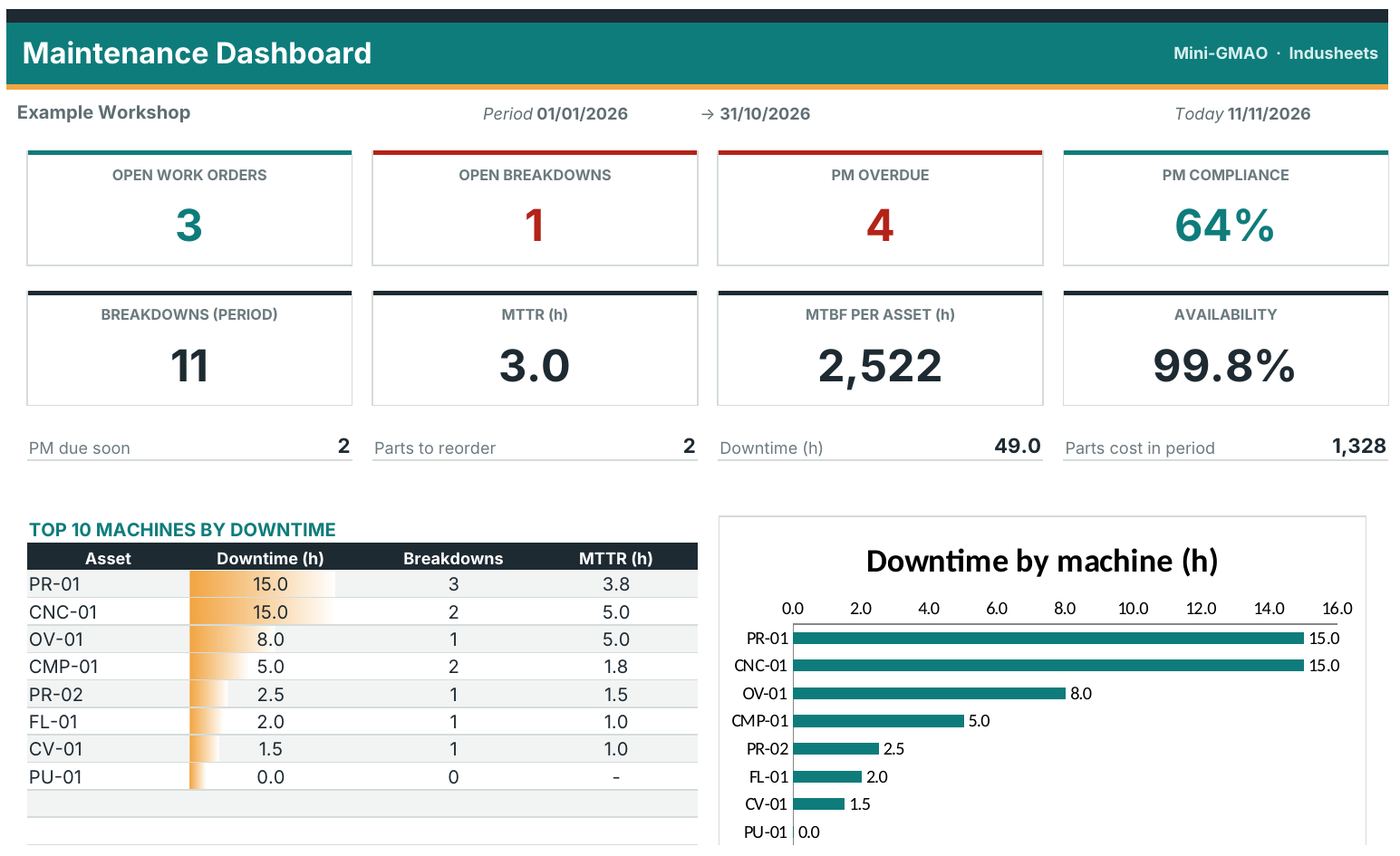
Dashboard
Open jobs, overdue PM, MTTR, MTBF, availability, top 10 downtime.
Settings
Site, period, operating hours and your own dropdown lists.
Assets
Machine register with automatic breakdown KPIs per machine.
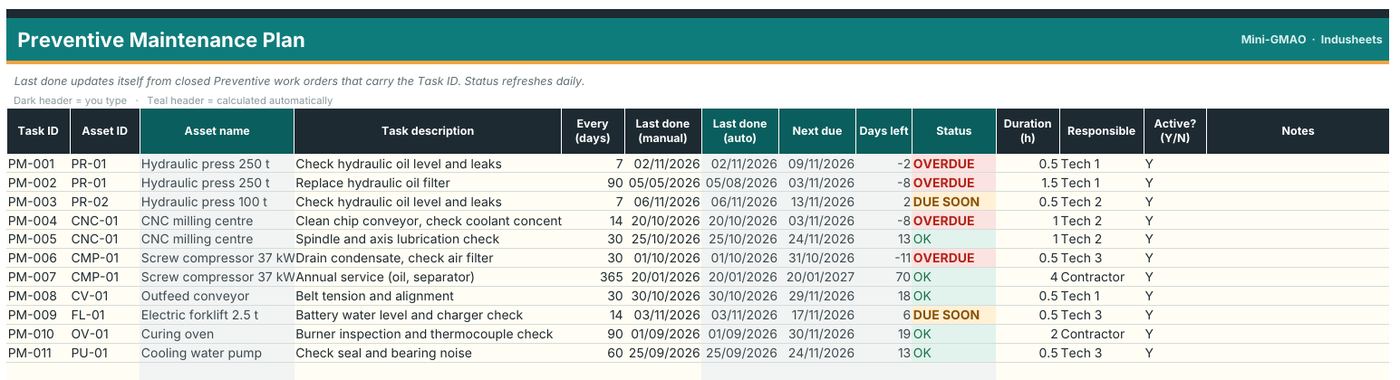
PM Plan
Preventive tasks turn OVERDUE, DUE SOON or OK every day.
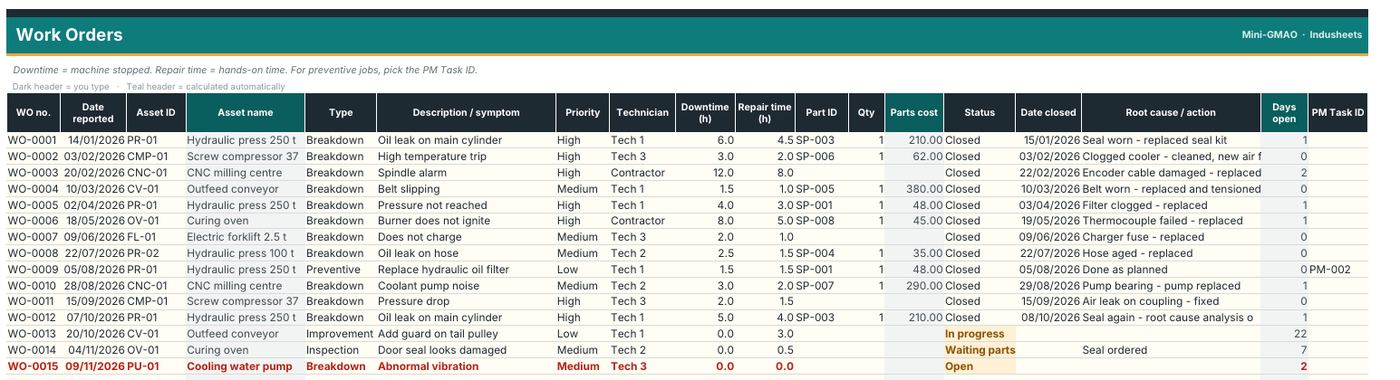
Work Orders
Every breakdown and job, with downtime, repair time and parts.
Spare Parts
Stock drops with each work order. Reorder alerts at the minimum.
User guide
Setup, daily use and the KPI formulas explained, in English and French.
See it before you buy it
From download to first KPI in 15 minutes
Set up
Enter your site, list your machines and their preventive tasks. The PDF guide walks you through it.
Log
One line per breakdown or job. Pick the machine and the part from dropdowns.
Review
Open the dashboard: overdue tasks, repeat failures and parts to order are flagged.
When a spreadsheet is the right tool
Mini-GMAO suits workshops and small plants that want structure without a software project. If you need a mobile app for every technician, a full CMMS is the better choice.
| Mini-GMAO | Typical CMMS software | |
|---|---|---|
| Price | €59 once | Monthly fee per user |
| Time to start | 15 minutes | Days to weeks of setup |
| Your data | In your own file | In the vendor's cloud |
| Mobile app, QR scanning | No | Usually yes |
| Best for | 1–5 technicians, up to 300 assets | Larger teams, many sites |
One payment. Yours to keep.
- Excel workbook, English and French versions
- Sample file with example data + blank file
- PDF user guide (EN / FR)
- Free updates of version 2
- Email support from the maker
Secure checkout. VAT calculated at payment. Instant download.
What you download
Not right for you? Email us within 14 days: we help you set it up, or refund you.
Questions before you buy
Which Excel versions does it work with?
Excel 2010 and later on Windows and Mac, Excel online and Google Sheets (File › Import). It uses no macros, so it opens without security warnings.
Can I add my own machine types, locations and technicians?
Yes. All dropdown lists are edited in the Settings tab.
How many machines can I track?
300 rows per register: assets, preventive tasks, work orders and spare parts. You can extend it by copying the last row.
How are MTTR, MTBF and availability calculated?
From the breakdown work orders in the analysis period you choose. The formulas are explained in the Start tab and in the PDF guide.
Can I use it on several sites?
The standard licence covers one site. Choose the 5-site licence if you run several plants.
What if it isn't right for me?
Email us within 14 days and tell us what didn't work. We'll help you set it up or refund you.
Quality and production kits are next
8D complaint kit, OEE & downtime, SPC & Gage R&R. Same idea: one tested workbook per job.